A Breakdown of a One Page Resume That Actually Works — And How to Write Yours

You've trimmed your resume to fit one page. Then you added the certification you forgot. Then the margins shrank to nothing, and now it looks like a legal document that lost a fight with a shrink-wrap machine.
Somewhere in that process, most people ask the same question: does this actually need to be one page, or am I torturing myself for a rule nobody explained properly?
Short answer: usually yes, it should stay one page — but not for the reason you think. It's not about length. It's about whether every line earns its place. Let's break down a real one-page resume, section by section, and then turn that into a repeatable process for yours.
TL;DR
One page is the default for most candidates with under 10–12 years of experience; it's about relevance, not a strict rule.
A strong one-pager (like Binod's) uses a tight summary, one flagship achievement instead of a full job history, categorized skills, and verifiable certifications.
Lead every bullet point with impact and numbers, not job duties.
Cut sections that aren't earning space — Objective statements and long education blocks are usually first.
A two-page resume is fine only when trimming further would mean losing real, relevant achievements.
Does Your Resume Really Need to Be One Page?
Recruiters spend an average of six to eight seconds on a first resume scan, according to eye-tracking research on recruiter behavior. That's not enough time to reward a second page of dense text — but it's plenty of time to notice a well-organized single page.
Here's the actual rule: one page is the default for most candidates with under 10–12 years of experience. Beyond that, a focused two-page resume is fine — but only if every section still earns its place. Page count is a tailoring decision, not a length contest.
Myth vs. fact:
Myth | Fact |
"More experience means more pages, automatically." | More experience means more editing. Recruiters want relevance, not your full career archive. |
"A two-page resume looks more senior." | A cluttered one looks unfocused, regardless of page count. |
"Cutting content means hiding my achievements." | Cutting content means choosing your three best achievements instead of listing fifteen average ones. |
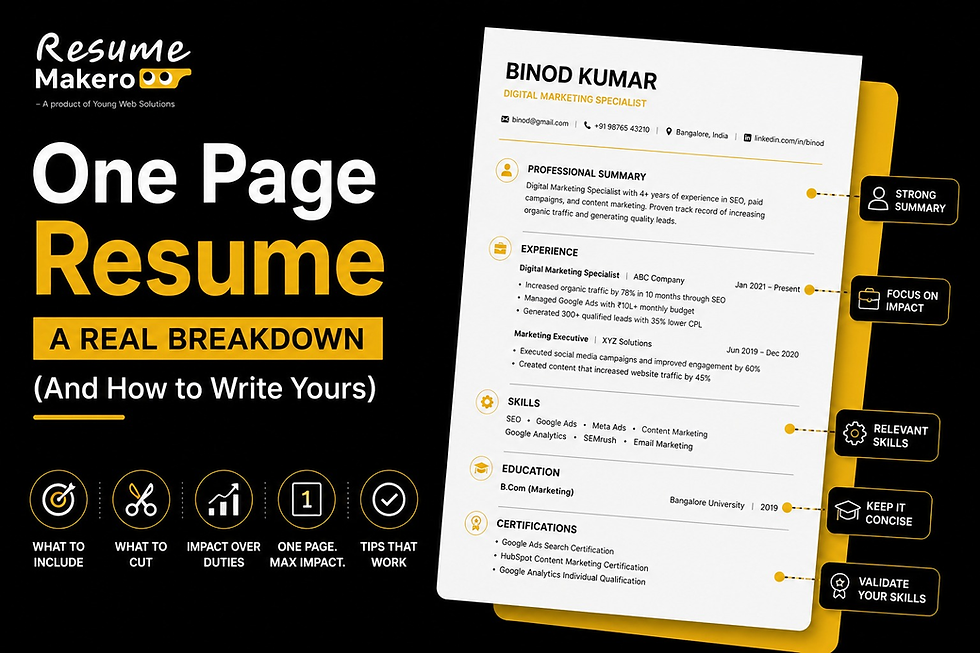
Meet Binod: Breaking Down a One-Page Resume That Works
We built this example resume inside our own builder for a fictional candidate we named Binod — full-stack developer, 7+ years of experience, IIT Bombay, Mumbai.
Quick side note, for anyone confused by the name: if you've spent any time on Indian internet in the last few years, "Binod" needs no introduction. It became the internet's unofficial placeholder for "an ordinary person who could be absolutely anyone," purely by accident, purely through repetition. Which, honestly, made him the perfect stand-in for this exercise — his resume could be yours with the details swapped out.
Here's what makes Binod's one-pager work, section by section.
The Header: Just Enough, Nothing Extra
Name, phone, email, location, LinkedIn, and portfolio — that's it. No objective statement disguised as a header, no unnecessary tagline.
Why it works: a header's only job is to make you easy to reach and easy to look up. Anything more is stealing space from your actual achievements.
The Summary: Three Lines, Not Three Paragraphs
Binod's summary reads: "Highly analytical and results-driven professional with 7+ years of experience in full-stack development. Proven ability to lead cross-functional teams, reduce system latency, and deliver mission-critical applications on schedule."
Why it works: it states the years of experience, the domain, and one measurable strength — latency reduction — in two sentences. A recruiter skimming this knows exactly what role Binod is suited for before reading a single bullet point.
Education: Kept Brief, on Purpose
One line: B.Tech in Computer Science, IIT Bombay, May 2018. No list of every course, no GPA breakdown, no "relevant coursework" section eating up space that could go to real project impact.
Why it works: at 7+ years of experience, recruiters weight your recent work far more than your degree. The education section exists to confirm the credential, not to relive it.
Projects Instead of a Long Job History
Rather than listing every role since 2018, Binod's resume highlights one flagship project — an order-processing platform that reduced fulfillment delays by 30 percent, built with Python, AWS Lambda, and DynamoDB.
Why it works: one specific, quantified project tells a recruiter more in two lines than five vague job descriptions would in half a page. Depth beats breadth here.
Key Skills, Split Into Categories
Instead of one long, undifferentiated list, skills are grouped: Technical (Python, JavaScript, TypeScript, Go) and Cloud & Tools (AWS, Docker, Kubernetes).
Why it works: categorizing skills lets a recruiter — or an ATS — instantly locate the exact keyword they're scanning for, instead of hunting through a wall of unrelated terms.
Certifications, With Proof
One line: AWS Certified Solutions Architect – Associate, with a linked certificate and date.
Why it works: a linkable, verifiable certification carries more weight than a bare mention, and it costs zero extra space to add the link.
Quick pause here. Building a resume like Binod's from a blank page is a lot easier with the right tool doing the formatting math for you. Resume Makero's builder shows you a live page-count estimate as you type — so you know the moment you've spilled onto page two, instead of finding out after you've already exported the PDF.
How to Fit Years of Experience Onto a Single Page
Whether you have 3 years of experience or 15, the same handful of techniques do most of the work.
Tailor to the job description, every time. Match your bullet points to the skills and responsibilities the posting actually lists. A resume trying to cover every job you've ever held ends up saying less about the one you're applying for.
Write bullet points that lead with impact, not duty. "Reduced fulfillment delays by 30%" says more in five words than "Responsible for managing order processing systems."
Use a compact, ATS-friendly layout. A well-structured two-column format can fit noticeably more content than a single-column Word template, without sacrificing readability.
Keep fonts legible but efficient. Size 10–11 is the sweet spot — smaller starts to strain the eyes of whoever's reading your resume at 11 p.m. after their fifteenth application of the day.
Cut sections that aren't earning space. Once you have solid work experience, a lengthy education section, a References list, or an Objective statement are usually the first things to go.
Group related details instead of listing them separately. Categorized skills, combined certifications, or a single standout project instead of five average ones — all of it saves space without cutting substance.
When a Two-Page Resume Actually Makes Sense
One page isn't a rule carved in stone. If you've spent 15+ years building a career with genuinely distinct, relevant achievements across multiple roles, a tight two-page resume can serve you better than an overstuffed single page.
The test: if trimming further means deleting achievements a recruiter would actually want to know about, you've earned the second page. If you're just deleting filler, keep cutting.
One more thing. A one-page resume only works if the content on it is airtight — no typos, no awkward phrasing, no missed keywords from the job description. Resume Makero's free AI resume review checks all three before you hit submit, no sign-up required.
Recommended Next Reads
A one-page resume works best when every section earns its place. If you're unsure what to include—or you're creating your first resume—these guides will help you take the next step:
Once your resume is ready, pair it with a tailored cover letter and prepare for common interview questions to improve your chances of getting shortlisted.
Frequently Asked Questions
1. Is a one-page resume mandatory for freshers? Yes, in almost every case. With limited work history, freshers rarely have enough relevant content to justify a second page, and a single, well-organized page reads as more confident than a padded one.
2. Can experienced professionals still use a one-page resume? Yes — plenty of senior professionals with 10+ years of experience still fit a one-pager by focusing only on their most recent and most relevant achievements, the way Binod's example does.
3. What should I remove first if my resume doesn't fit on one page? Start with an Objective statement, a References section, or an overly detailed Education section — these typically add the least value once you have real work experience to show instead.
4. Does a one-page resume hurt my chances if I have a long career? No. Recruiters don't expect a full career history on a resume — they expect the most relevant highlights. A one-pager that's tightly relevant usually outperforms a two-pager padded with older, less relevant roles.
5. What font size should I use to fit more on one page? Size 10 or 11 is generally the smallest you should go while keeping the resume comfortably readable — and readable by ATS software as well.
6. Should I use a one-column or two-column resume template for a one-pager? A well-designed two-column layout can fit meaningfully more content than a single-column template without feeling cramped, as long as it's still built to pass ATS parsing.
7. How do I know if I should switch to a two-page resume? If cutting further would mean removing achievements a recruiter would genuinely want to see — not just filler — it's time for a second page.
Your Next Step
Pull up your current resume and go section by section, the way we just did with Binod's. For each line, ask: does this help me get this specific job, or is it just taking up space I could use for something stronger?
Cut what doesn't earn its place, tighten what stays, and check your page count before you second-guess every font size in existence.
Build your one-pager without the guesswork. Try Resume Makero's free resume builder — it shows your estimated page count as you type, so you know the moment you've drifted onto page two. No sign-up required, and your data stays private.